> ## Documentation Index
> Fetch the complete documentation index at: https://docs.linkutm.com/llms.txt
> Use this file to discover all available pages before exploring further.
# Google Analytics 4
> How linkutm UTM parameters map to GA4 dimensions, how to set up custom dimensions for utm_content and utm_term, and how to verify your attribution is clean.
## What it is
GA4 reads UTM parameters from the destination URL automatically. When a visitor clicks a linkutm link, the UTM values you set travel through the redirect and land on the destination page. GA4 picks them up as traffic source dimensions and attributes the session accordingly.
No special setup is required for basic source/medium/campaign attribution. Custom dimensions are needed if you want `utm_content` and `utm_term` to appear in GA4 reports.
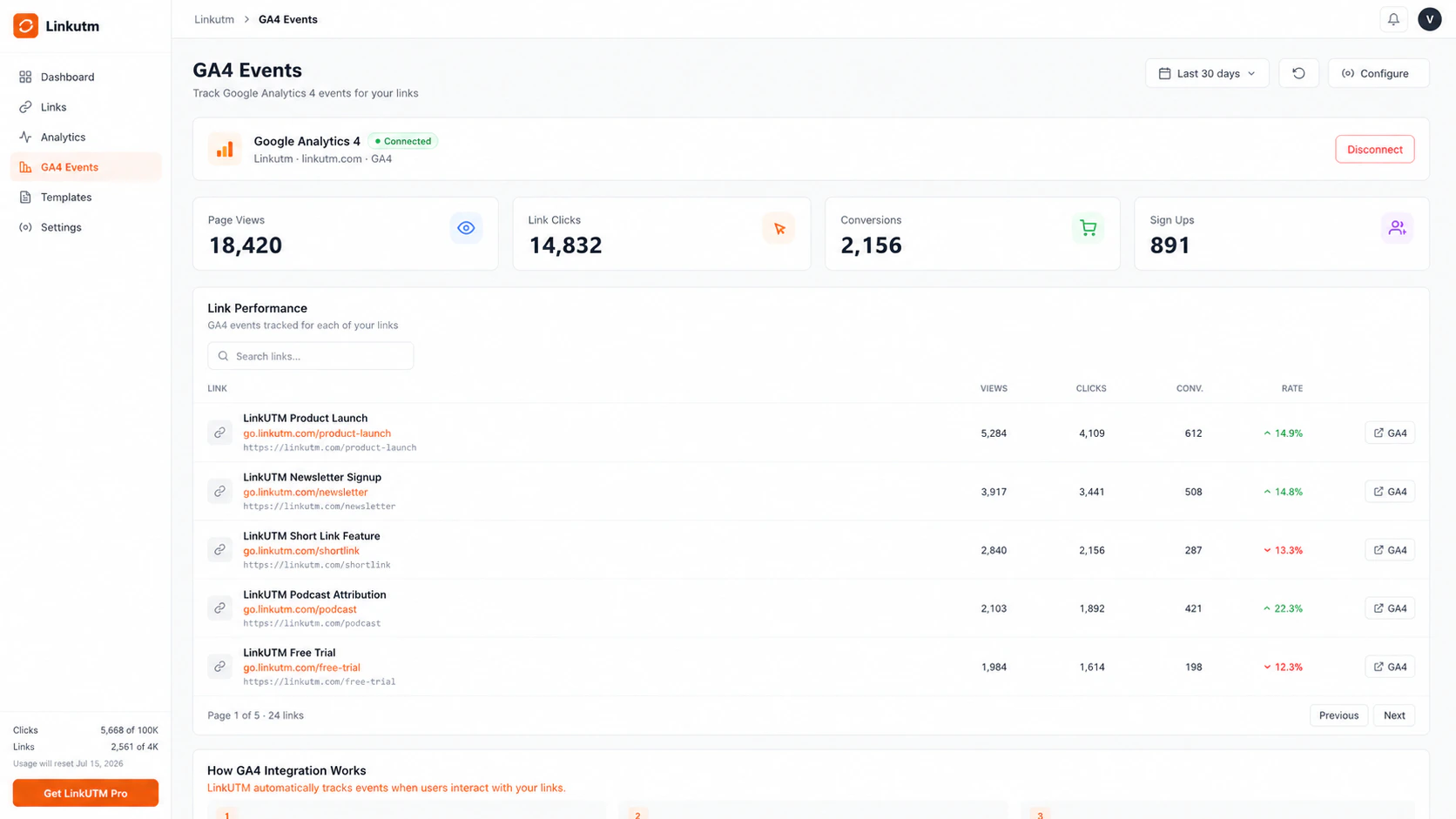
linkutm's [Pixel Tracking](/integrations/pixel-tracking) integration fires a GA4 PageView event on the short link click itself (at the redirect page). UTM attribution covers the destination page session. These are complementary, not the same thing.
 ***
## Per-link GA4 analytics
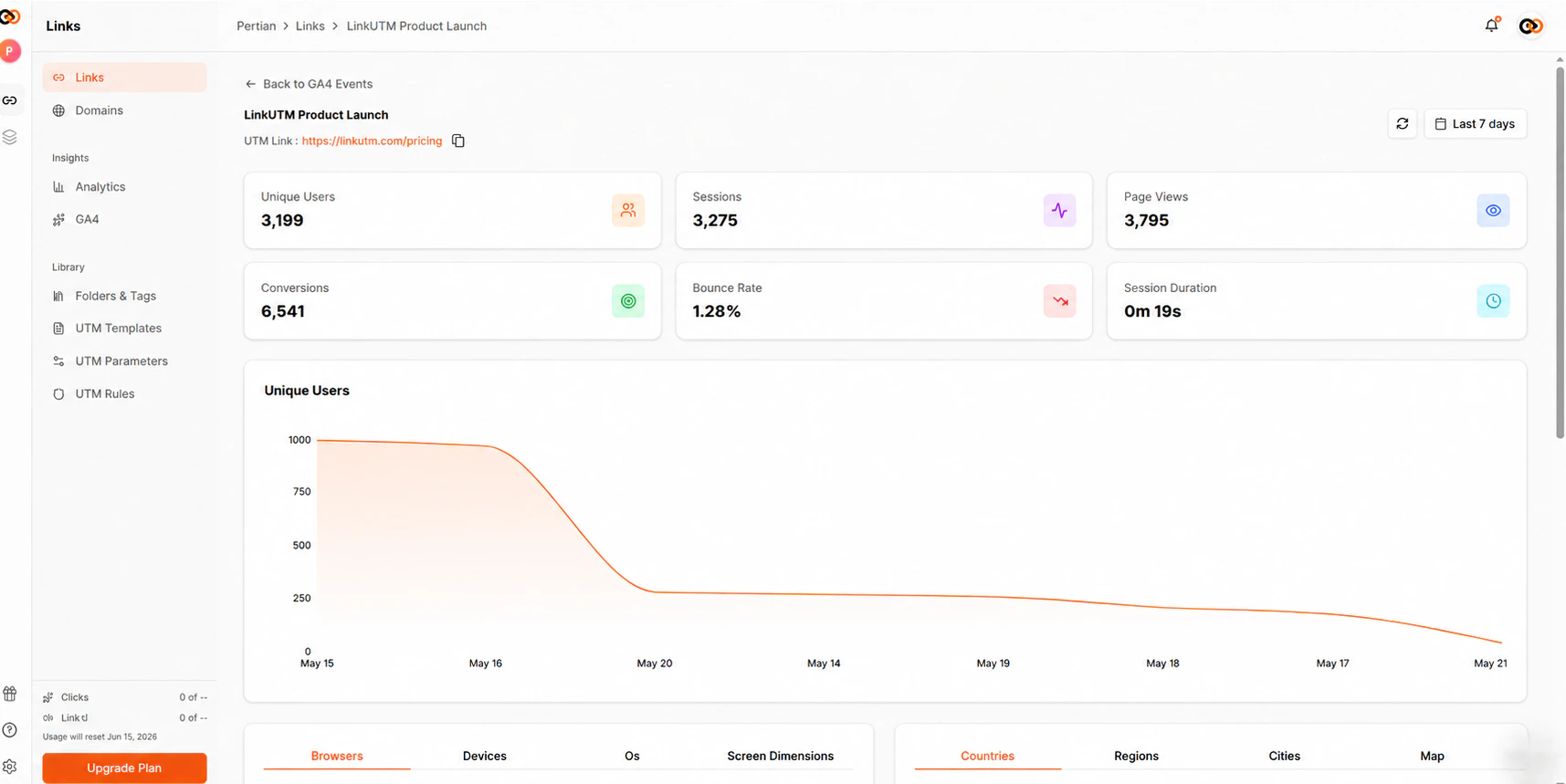
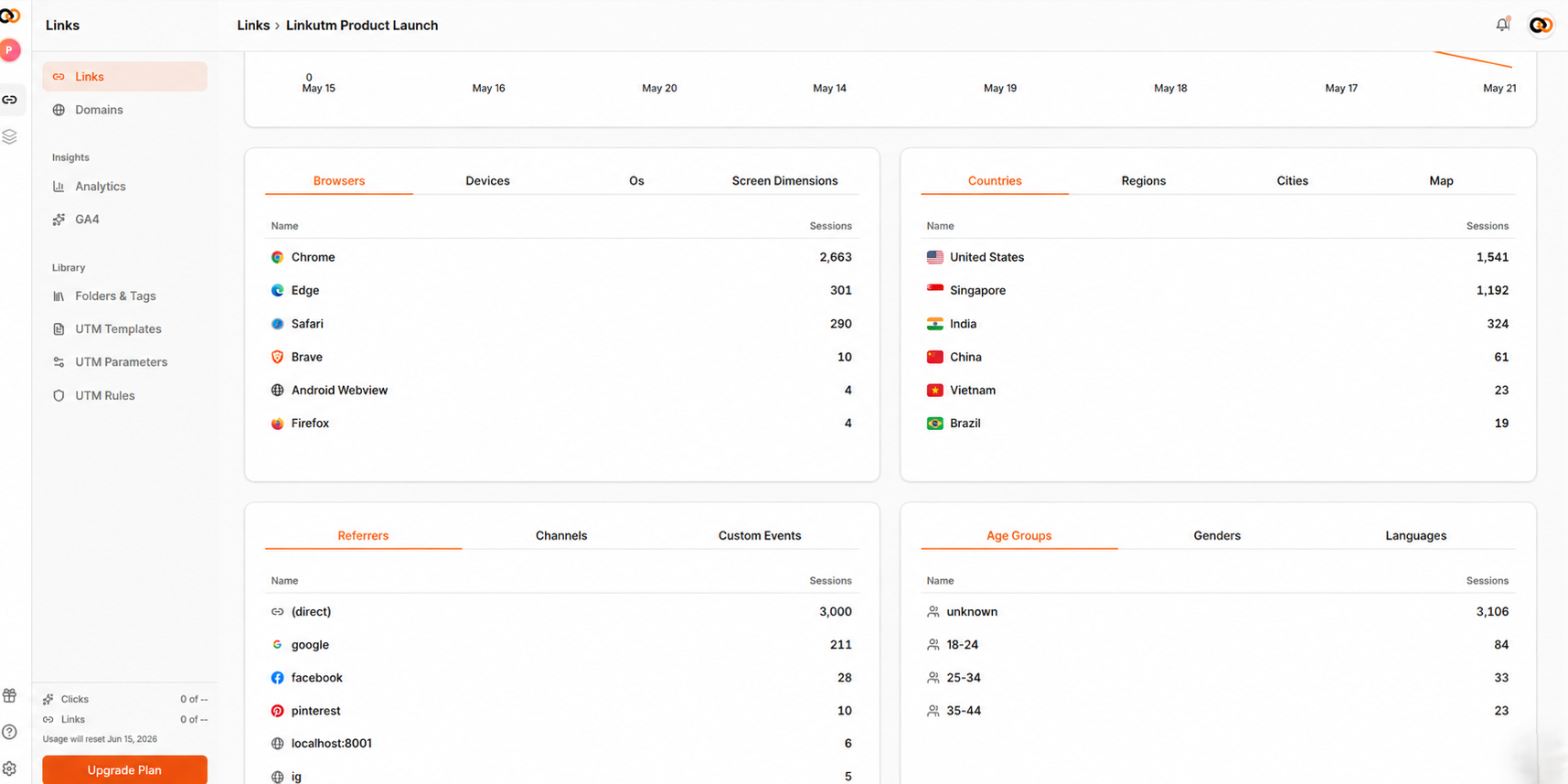
Click any link in the GA4 Events dashboard to see its individual event breakdown, views, clicks, conversions, and event timeline.
***
## Per-link GA4 analytics
Click any link in the GA4 Events dashboard to see its individual event breakdown, views, clicks, conversions, and event timeline.
 ***
## How GA4 reads UTMs
GA4 captures five UTM parameters automatically on session start:
| UTM parameter | GA4 dimension | Where it shows up |
| -------------- | ------------------------- | ---------------------------------------- |
| `utm_source` | Session source | Traffic acquisition, Explore |
| `utm_medium` | Session medium | Traffic acquisition, Explore |
| `utm_campaign` | Session campaign | Traffic acquisition, Explore |
| `utm_content` | Session manual ad content | Explore only (requires custom dimension) |
| `utm_term` | Session manual term | Explore only (requires custom dimension) |
Source, medium, and campaign appear in the built-in Traffic Acquisition report out of the box. Content and term require a custom dimension to surface in standard reports.
***
## Channel grouping
GA4 uses `utm_medium` to place sessions into channel groups in the Default Channel Grouping report. If your medium values don't match GA4's rules, sessions land in "Unassigned."
| linkutm medium value | GA4 Default Channel |
| --------------------- | ------------------- |
| `cpc` | Paid Search |
| `paid-social` | Paid Social |
| `email` | Email |
| `display` | Display |
| `video` | Paid Video |
| `affiliate` | Affiliates |
| `organic-social` | Organic Social |
| `referral` | Referral |
| `(none)` + `(direct)` | Direct |
| Anything else | Unassigned |
Custom medium values like `newsletter`, `podcast`, or `qr` don't match any GA4 default channel rule and will land in Unassigned. This is expected. You can create custom channel groups in GA4 Admin → Data Display → Channel Groups to handle them.
The [UTM naming convention](/playbooks/utm-naming-convention) page lists the recommended medium vocab that maps cleanly to GA4's default channels.
***
## Set up custom dimensions for utm\_content and utm\_term
GA4 does not expose `utm_content` and `utm_term` in standard reports unless you register them as custom dimensions.
Go to **Admin → Data display → Custom definitions**.
Click **Create custom dimension** and fill in:
* **Dimension name:** `Manual Ad Content`
* **Scope:** Session
* **Event parameter:** `manual_content`
Save.
Click **Create custom dimension** again:
* **Dimension name:** `Manual Term`
* **Scope:** Session
* **Event parameter:** `manual_term`
Save.
Custom dimensions only collect data going forward. Allow 24-48 hours before they appear in reports. Historical sessions are not backfilled.
In GA4 Explore, add **Manual Ad Content** or **Manual Term** as a dimension. These are now available across any exploration report.
***
## Verify attribution is working
Use GA4 DebugView to confirm UTMs are being captured before you run a campaign.
Install the [Google Analytics Debugger](https://chrome.google.com/webstore/detail/google-analytics-debugger/jnkmfdileelhofjcijamephohjechhna) Chrome extension and enable it.
Create a test link in linkutm with known UTM values. Click it.
In GA4 Admin → DebugView, look for the `session_start` event. Expand it and confirm:
* `traffic_source.source` matches your `utm_source`
* `traffic_source.medium` matches your `utm_medium`
* `traffic_source.campaign` matches your `utm_campaign`
Look for `manual_content` and `manual_term` parameters on the same event if you set those UTMs on the test link.
***
## Real-world example
A marketing team runs three links for a Q2 campaign and wants to see clean channel splits in GA4.
```
Link 1 (Google Ads):
utm_source=google
utm_medium=cpc
utm_campaign=q2-pricing-relaunch
utm_content=headline-a
utm_term=utm+tracking+tool
→ GA4: Paid Search | q2-pricing-relaunch
Link 2 (Newsletter):
utm_source=newsletter
utm_medium=email
utm_campaign=q2-pricing-relaunch
utm_content=hero-cta
→ GA4: Email | q2-pricing-relaunch
Link 3 (LinkedIn Ads):
utm_source=linkedin
utm_medium=paid-social
utm_campaign=q2-pricing-relaunch
utm_content=cta-book-demo
→ GA4: Paid Social | q2-pricing-relaunch
```
In GA4 Traffic Acquisition, filter by `campaign = q2-pricing-relaunch` to see all three channels side by side. In Explore, add Manual Ad Content to compare `headline-a` vs `hero-cta` vs `cta-book-demo` on conversions.
***
## Common mistakes
Three causes: the UTMs were stripped from the URL before GA4 loaded (check for URL rewrites or redirects that drop query params), the visitor's browser blocked the GA4 tag, or cookie consent blocked the tag from firing. Use DebugView to rule out the first cause.
If a visitor clicks `go.yourdomain.com/xyz` and GA4 fires on the destination page, GA4 may record the short link domain as the referrer instead of reading the UTM. This happens when linkutm's redirect passes the referrer header. Fix: add your short link domain to the **Referral exclusion list** in GA4 Admin → Data streams → Configure tag settings → List unwanted referrals.
The UTM was missing from the link or was stripped during redirect. Check the actual destination URL in browser dev tools → Network tab → look at the final URL after redirect to confirm `utm_campaign` is present.
Your `utm_medium` value doesn't match GA4's channel rules. `paid-social` and `cpc` are correct. `PaidSocial`, `paid_social`, or `social` are not. See the channel grouping table above.
The custom dimension for `manual_content` has not been created yet, or was created after the sessions you're looking at (no backfill). Create the dimension and wait 24-48 hours for new data.
***
## Edge cases
**Internal traffic.** If you or your team click linkutm links during testing, those sessions will appear in GA4. Define an internal traffic rule in GA4 Admin → Data streams → Configure tag settings → Define internal traffic to exclude your IP ranges.
**Cross-domain tracking.** If your destination page is on a different domain from your short link (e.g. `go.yourdomain.com` redirects to `app.yourproduct.com`), GA4 may count the visit as a new session and lose the UTM. Add the short link domain to the cross-domain list in GA4 Admin → Data streams → Configure tag settings → Configure your domains.
**UTM parameters persist for the session only.** GA4 attributes UTMs to the session in which the user first arrived. If the same user returns later without UTMs, GA4 does not re-attribute that session. This is standard GA4 behavior, not a linkutm issue.
***
## How GA4 reads UTMs
GA4 captures five UTM parameters automatically on session start:
| UTM parameter | GA4 dimension | Where it shows up |
| -------------- | ------------------------- | ---------------------------------------- |
| `utm_source` | Session source | Traffic acquisition, Explore |
| `utm_medium` | Session medium | Traffic acquisition, Explore |
| `utm_campaign` | Session campaign | Traffic acquisition, Explore |
| `utm_content` | Session manual ad content | Explore only (requires custom dimension) |
| `utm_term` | Session manual term | Explore only (requires custom dimension) |
Source, medium, and campaign appear in the built-in Traffic Acquisition report out of the box. Content and term require a custom dimension to surface in standard reports.
***
## Channel grouping
GA4 uses `utm_medium` to place sessions into channel groups in the Default Channel Grouping report. If your medium values don't match GA4's rules, sessions land in "Unassigned."
| linkutm medium value | GA4 Default Channel |
| --------------------- | ------------------- |
| `cpc` | Paid Search |
| `paid-social` | Paid Social |
| `email` | Email |
| `display` | Display |
| `video` | Paid Video |
| `affiliate` | Affiliates |
| `organic-social` | Organic Social |
| `referral` | Referral |
| `(none)` + `(direct)` | Direct |
| Anything else | Unassigned |
Custom medium values like `newsletter`, `podcast`, or `qr` don't match any GA4 default channel rule and will land in Unassigned. This is expected. You can create custom channel groups in GA4 Admin → Data Display → Channel Groups to handle them.
The [UTM naming convention](/playbooks/utm-naming-convention) page lists the recommended medium vocab that maps cleanly to GA4's default channels.
***
## Set up custom dimensions for utm\_content and utm\_term
GA4 does not expose `utm_content` and `utm_term` in standard reports unless you register them as custom dimensions.
Go to **Admin → Data display → Custom definitions**.
Click **Create custom dimension** and fill in:
* **Dimension name:** `Manual Ad Content`
* **Scope:** Session
* **Event parameter:** `manual_content`
Save.
Click **Create custom dimension** again:
* **Dimension name:** `Manual Term`
* **Scope:** Session
* **Event parameter:** `manual_term`
Save.
Custom dimensions only collect data going forward. Allow 24-48 hours before they appear in reports. Historical sessions are not backfilled.
In GA4 Explore, add **Manual Ad Content** or **Manual Term** as a dimension. These are now available across any exploration report.
***
## Verify attribution is working
Use GA4 DebugView to confirm UTMs are being captured before you run a campaign.
Install the [Google Analytics Debugger](https://chrome.google.com/webstore/detail/google-analytics-debugger/jnkmfdileelhofjcijamephohjechhna) Chrome extension and enable it.
Create a test link in linkutm with known UTM values. Click it.
In GA4 Admin → DebugView, look for the `session_start` event. Expand it and confirm:
* `traffic_source.source` matches your `utm_source`
* `traffic_source.medium` matches your `utm_medium`
* `traffic_source.campaign` matches your `utm_campaign`
Look for `manual_content` and `manual_term` parameters on the same event if you set those UTMs on the test link.
***
## Real-world example
A marketing team runs three links for a Q2 campaign and wants to see clean channel splits in GA4.
```
Link 1 (Google Ads):
utm_source=google
utm_medium=cpc
utm_campaign=q2-pricing-relaunch
utm_content=headline-a
utm_term=utm+tracking+tool
→ GA4: Paid Search | q2-pricing-relaunch
Link 2 (Newsletter):
utm_source=newsletter
utm_medium=email
utm_campaign=q2-pricing-relaunch
utm_content=hero-cta
→ GA4: Email | q2-pricing-relaunch
Link 3 (LinkedIn Ads):
utm_source=linkedin
utm_medium=paid-social
utm_campaign=q2-pricing-relaunch
utm_content=cta-book-demo
→ GA4: Paid Social | q2-pricing-relaunch
```
In GA4 Traffic Acquisition, filter by `campaign = q2-pricing-relaunch` to see all three channels side by side. In Explore, add Manual Ad Content to compare `headline-a` vs `hero-cta` vs `cta-book-demo` on conversions.
***
## Common mistakes
Three causes: the UTMs were stripped from the URL before GA4 loaded (check for URL rewrites or redirects that drop query params), the visitor's browser blocked the GA4 tag, or cookie consent blocked the tag from firing. Use DebugView to rule out the first cause.
If a visitor clicks `go.yourdomain.com/xyz` and GA4 fires on the destination page, GA4 may record the short link domain as the referrer instead of reading the UTM. This happens when linkutm's redirect passes the referrer header. Fix: add your short link domain to the **Referral exclusion list** in GA4 Admin → Data streams → Configure tag settings → List unwanted referrals.
The UTM was missing from the link or was stripped during redirect. Check the actual destination URL in browser dev tools → Network tab → look at the final URL after redirect to confirm `utm_campaign` is present.
Your `utm_medium` value doesn't match GA4's channel rules. `paid-social` and `cpc` are correct. `PaidSocial`, `paid_social`, or `social` are not. See the channel grouping table above.
The custom dimension for `manual_content` has not been created yet, or was created after the sessions you're looking at (no backfill). Create the dimension and wait 24-48 hours for new data.
***
## Edge cases
**Internal traffic.** If you or your team click linkutm links during testing, those sessions will appear in GA4. Define an internal traffic rule in GA4 Admin → Data streams → Configure tag settings → Define internal traffic to exclude your IP ranges.
**Cross-domain tracking.** If your destination page is on a different domain from your short link (e.g. `go.yourdomain.com` redirects to `app.yourproduct.com`), GA4 may count the visit as a new session and lose the UTM. Add the short link domain to the cross-domain list in GA4 Admin → Data streams → Configure tag settings → Configure your domains.
**UTM parameters persist for the session only.** GA4 attributes UTMs to the session in which the user first arrived. If the same user returns later without UTMs, GA4 does not re-attribute that session. This is standard GA4 behavior, not a linkutm issue.