> ## Documentation Index
> Fetch the complete documentation index at: https://docs.linkutm.com/llms.txt
> Use this file to discover all available pages before exploring further.
# Link preview
> Override the social-share preview card title, description, image.
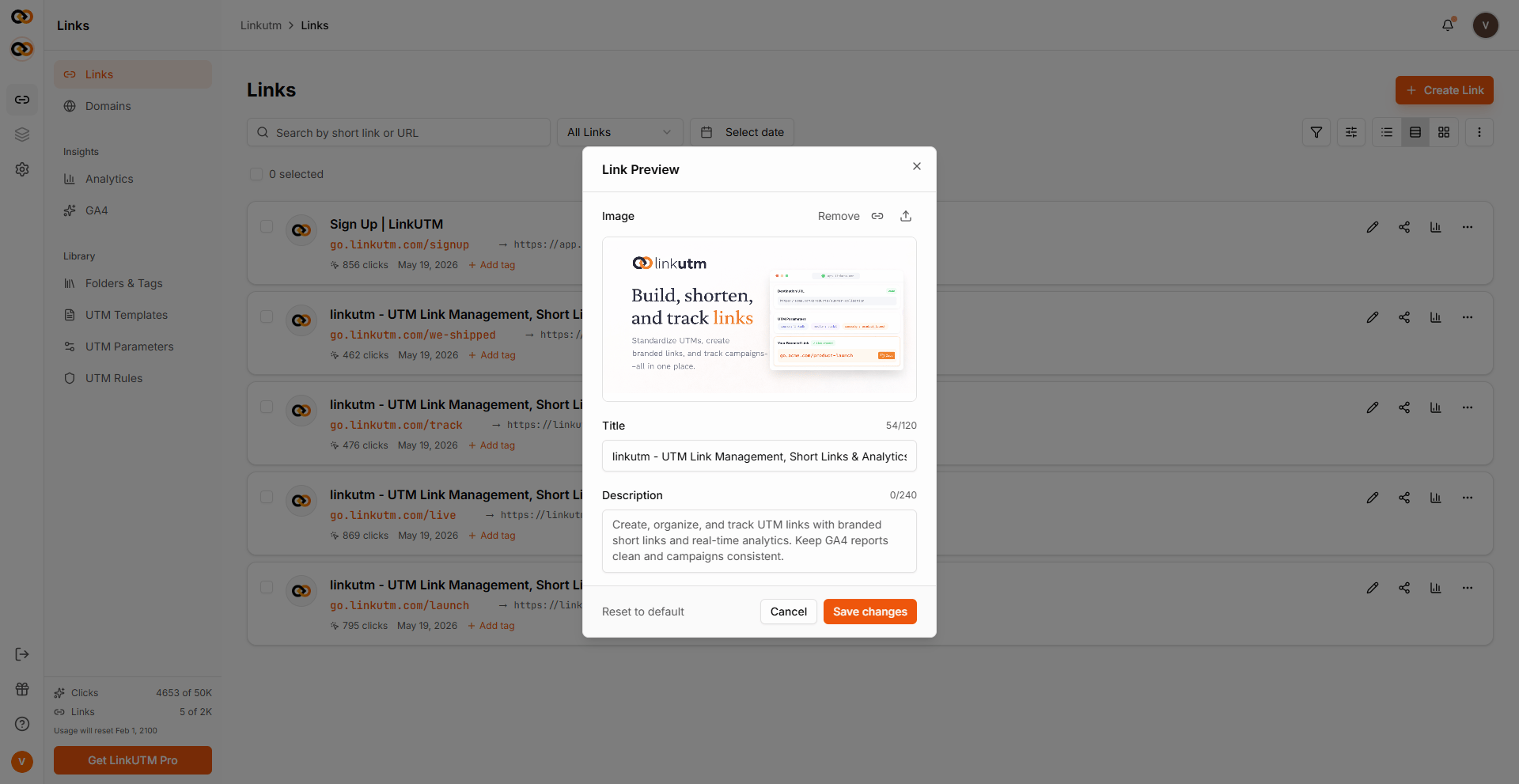
When someone pastes your short link into Slack, LinkedIn, WhatsApp, or similar apps, the platform fetches link preview tags to render a preview card. linkutm lets you override the preview title, description, and image per link without touching the destination page.
## When to use it
* Destination doesn't have preview tags (or has bad ones).
* You want a campaign-specific preview without changing the page.
* A/B testing share previews across channels.
## How to use it
In the link creation, expand **Advanced** and find the **Social preview** section.
Card headline. Keep ≤60 chars.
Subline. Keep ≤155 chars.
Public image URL. Recommended 1200×630px PNG/JPG.
 ## Real-world example
Same destination URL, different previews per channel:
```
Short: go.acme.com/launch-li (LinkedIn)
Preview title: Acme Widget - built for engineering teams
Preview image: https://cdn.acme.com/og/launch-linkedin.png
Short: go.acme.com/launch-x (X/Twitter)
Preview title: Acme Widget. Now in beta.
Preview image: https://cdn.acme.com/og/launch-twitter.png
```
Same destination `https://acme.com/launch`. Per-link preview settings drive different share cards.
## Common mistakes
If the destination already has correct preview tags, you don't need this. Override only when you want different cards per link.
LinkedIn and Meta cache preview data. Use their debug tools to flush after changes.
Files over \~5 MB or URLs behind auth won't render. 1200×630 PNG/JPG, public.
If your preview image address starts with `http` instead of `https`, some platforms block it from showing. Always use an `https` image address.
## Edge cases
**Imported links** auto-fetch preview data from the destination during import (5s timeout). If the fetch fails, the favicon falls back to Google's favicon service for the destination domain.
## Real-world example
Same destination URL, different previews per channel:
```
Short: go.acme.com/launch-li (LinkedIn)
Preview title: Acme Widget - built for engineering teams
Preview image: https://cdn.acme.com/og/launch-linkedin.png
Short: go.acme.com/launch-x (X/Twitter)
Preview title: Acme Widget. Now in beta.
Preview image: https://cdn.acme.com/og/launch-twitter.png
```
Same destination `https://acme.com/launch`. Per-link preview settings drive different share cards.
## Common mistakes
If the destination already has correct preview tags, you don't need this. Override only when you want different cards per link.
LinkedIn and Meta cache preview data. Use their debug tools to flush after changes.
Files over \~5 MB or URLs behind auth won't render. 1200×630 PNG/JPG, public.
If your preview image address starts with `http` instead of `https`, some platforms block it from showing. Always use an `https` image address.
## Edge cases
**Imported links** auto-fetch preview data from the destination during import (5s timeout). If the fetch fails, the favicon falls back to Google's favicon service for the destination domain.