> ## Documentation Index
> Fetch the complete documentation index at: https://docs.linkutm.com/llms.txt
> Use this file to discover all available pages before exploring further.
# UTM builder
> The five fields, what they mean, and how linkutm cleans them before saving.
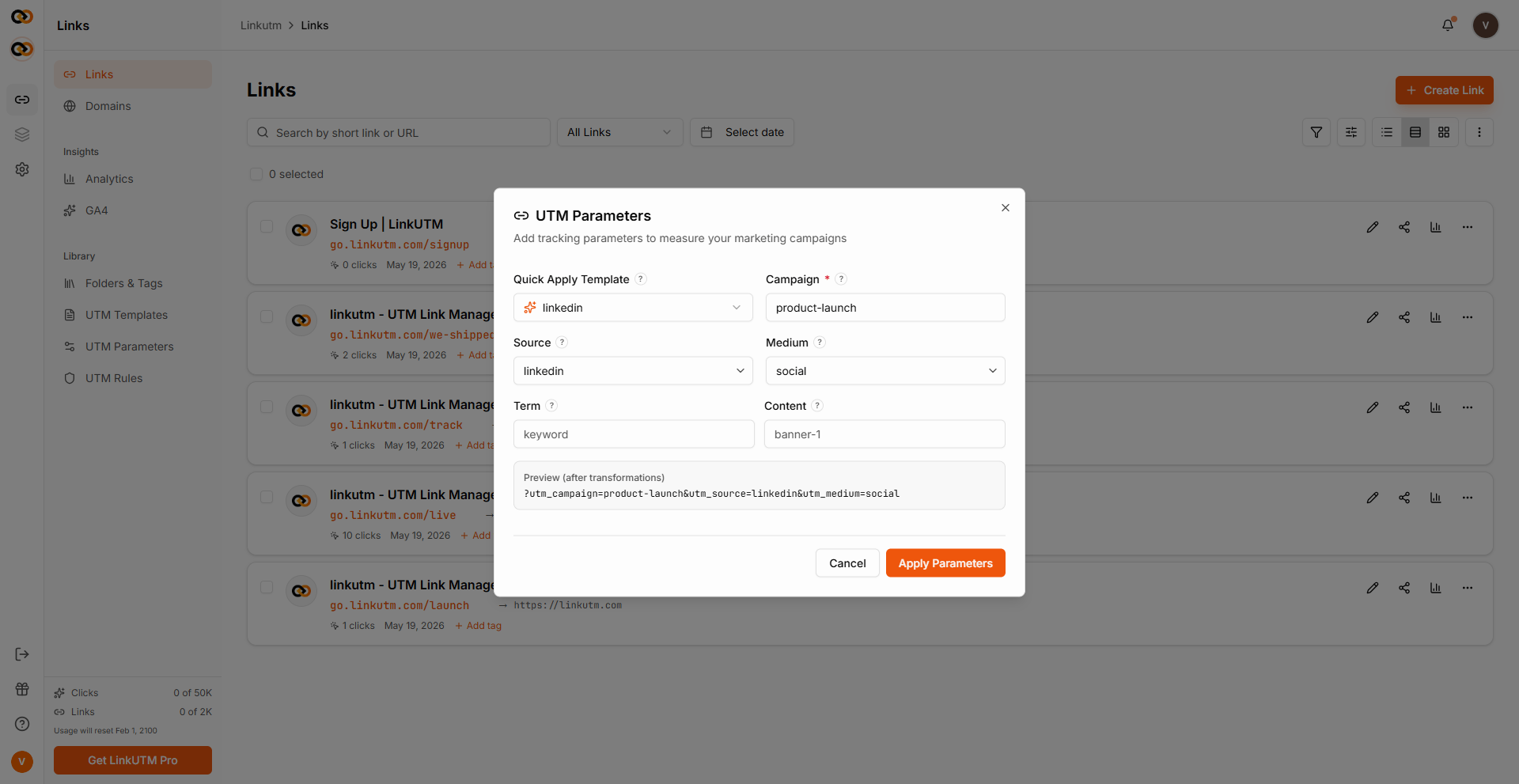
The UTM section of the link builder. Five standard fields plus optional custom UTMs. Values are cleaned by your [workspace UTM rules](/utm-rules/overview) on save.
## When to use it
Every link. UTMs are how Google Analytics, Mixpanel, Amplitude, and most attribution tools tell campaigns apart.
## The five fields
Which initiative this belongs to.
Examples: `q2-launch`, `black-friday-2025`, `weekly-digest`.
Where the click came from. Treat as a "platform name."
Examples: `google`, `facebook`, `newsletter`, `partner-blog`.
How the click was delivered. The "channel type."
Examples: `cpc`, `email`, `social`, `display`, `affiliate`.
Optional. Paid search keyword or audience segment.
Examples: `running-shoes`, `lookalike-us`.
Optional. Differentiator for A/B variants or creative pieces.
Examples: `headline-a`, `carousel-3`, `cta-orange`.
 ## How it works
When you save a link, the entered values pass through your workspace's UTM Rules in this order:
`Summer-Sale` → `summer-sale` (default ON).
`summer sale` → `summer_sale` using your configured space character (default `_`).
Truncated/rejected if over the workspace limit (default 100).
Hard fail if value contains any banned term you set ("test", "draft", etc).
Hard fail if value contains characters outside the set you allow (lowercase, numbers, dots, hyphens). Skipped if you haven't restricted any.
The cleaned values are stored. See [UTM Rules](/utm-rules/overview) to configure each step.
## Custom UTM parameters
Beyond the five standards, you can attach additional custom parameters to a link. Add a name and value in the Custom UTM Parameters section, and they are appended to every redirect as extra URL parameters. For example, adding `audience` = `lookalike-3` appends `&utm_audience=lookalike-3` to the destination URL.
## Real-world examples
```
utm_source=google
utm_medium=cpc
utm_campaign=q2-launch
utm_term={keyword} ← Google Ads dynamic insertion
utm_content=headline-a
```
```
utm_source=facebook
utm_medium=paid-social
utm_campaign=q2-launch
utm_content=video-carousel-v2
```
```
utm_source=newsletter
utm_medium=email
utm_campaign=weekly-digest-2025-w19
utm_content=hero-cta
```
```
utm_source=partner-jane-doe
utm_medium=affiliate
utm_campaign=q2-launch
```
## Common mistakes
`source=email, medium=newsletter` is wrong. Source = *platform name*; medium = *channel type*. Right: `source=newsletter, medium=email`.
`Q2 Launch !!`, `q2 launch`, `Q2_Launch` become different rows in GA without rules. Use a [template](/utm-templates/overview) per campaign.
`utm_term` is conventionally paid-search keyword. For audience segments use `utm_content` or a custom UTM.
UTMs land in your destination URL and analytics. Don't include emails, names, anything personally identifiable.
## Edge cases
**UTMs already on the destination URL** are preserved. linkutm appends its UTMs alongside them; if there's a key collision, linkutm's value wins.
## How it works
When you save a link, the entered values pass through your workspace's UTM Rules in this order:
`Summer-Sale` → `summer-sale` (default ON).
`summer sale` → `summer_sale` using your configured space character (default `_`).
Truncated/rejected if over the workspace limit (default 100).
Hard fail if value contains any banned term you set ("test", "draft", etc).
Hard fail if value contains characters outside the set you allow (lowercase, numbers, dots, hyphens). Skipped if you haven't restricted any.
The cleaned values are stored. See [UTM Rules](/utm-rules/overview) to configure each step.
## Custom UTM parameters
Beyond the five standards, you can attach additional custom parameters to a link. Add a name and value in the Custom UTM Parameters section, and they are appended to every redirect as extra URL parameters. For example, adding `audience` = `lookalike-3` appends `&utm_audience=lookalike-3` to the destination URL.
## Real-world examples
```
utm_source=google
utm_medium=cpc
utm_campaign=q2-launch
utm_term={keyword} ← Google Ads dynamic insertion
utm_content=headline-a
```
```
utm_source=facebook
utm_medium=paid-social
utm_campaign=q2-launch
utm_content=video-carousel-v2
```
```
utm_source=newsletter
utm_medium=email
utm_campaign=weekly-digest-2025-w19
utm_content=hero-cta
```
```
utm_source=partner-jane-doe
utm_medium=affiliate
utm_campaign=q2-launch
```
## Common mistakes
`source=email, medium=newsletter` is wrong. Source = *platform name*; medium = *channel type*. Right: `source=newsletter, medium=email`.
`Q2 Launch !!`, `q2 launch`, `Q2_Launch` become different rows in GA without rules. Use a [template](/utm-templates/overview) per campaign.
`utm_term` is conventionally paid-search keyword. For audience segments use `utm_content` or a custom UTM.
UTMs land in your destination URL and analytics. Don't include emails, names, anything personally identifiable.
## Edge cases
**UTMs already on the destination URL** are preserved. linkutm appends its UTMs alongside them; if there's a key collision, linkutm's value wins.