> ## Documentation Index
> Fetch the complete documentation index at: https://docs.linkutm.com/llms.txt
> Use this file to discover all available pages before exploring further.
# Templates overview
> Save UTM presets so the team stops re-typing source/medium for every link.
Before creating templates, agree on your team's naming convention. The [UTM naming convention](/playbooks/utm-naming-convention) playbook defines the approved source, medium, and campaign values your templates should use.
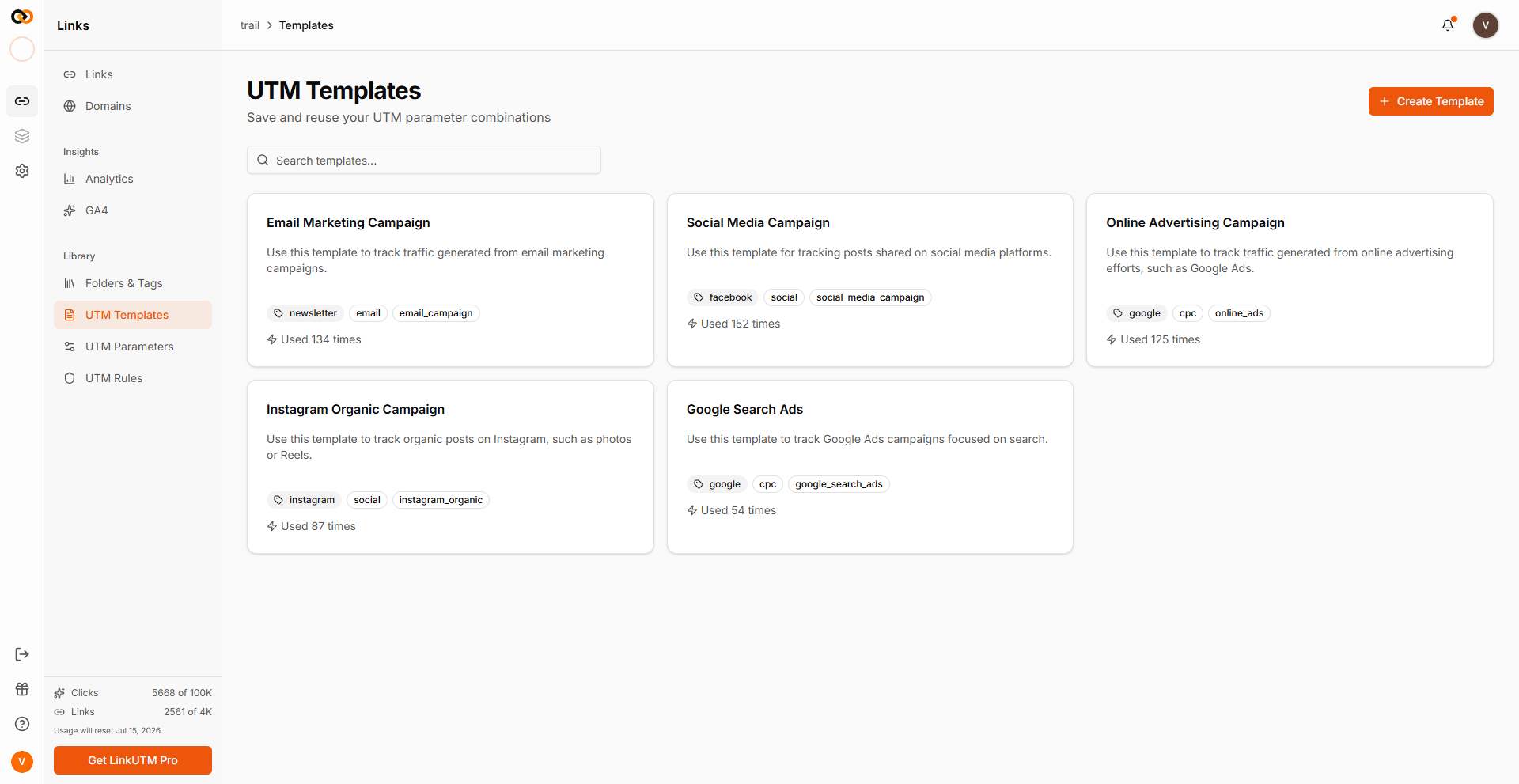
A UTM template is a saved set of UTM values (source, medium, campaign, term, content) you can apply with one click in the link builder. Workspace-scoped. Track how often each is used.
 ## When to use it
* Same channel, repeat campaigns: weekly newsletter, monthly Google Ads, recurring event.
* Multi-person team - without templates, three marketers will spell `Newsletter`/`newsletter`/`news_letter` differently.
* Big launches with 20+ links per channel.
If you only build a one-off link a quarter, skip templates. Use [UTM Rules](/utm-rules/overview) instead - they apply automatically to all links.
## How it works
A template stores the raw UTM values. When applied during link creation, they pre-fill the form. You can override any field before saving.
The system tracks how many times each template has been used - see [Manage templates](/utm-templates/manage-templates) for the most-used view.
## Real-world example
A SaaS company runs:
| Template | source | medium | campaign |
| ------------------- | ------------ | ------------- | ---------------- |
| Newsletter Weekly | `newsletter` | `email` | `weekly-digest` |
| Google Brand Search | `google` | `cpc` | `brand-search` |
| Meta Retargeting | `facebook` | `paid-social` | `retargeting-v2` |
| LinkedIn Webinar | `linkedin` | `paid-social` | `webinar-q2` |
Marketer building this week's newsletter link: pick **Newsletter Weekly** template → fill destination URL + content (`hero_cta`) → done in 5 seconds.
## Common mistakes
Templates are for shape, not specific links. Make `Newsletter Weekly`, not `Newsletter Week 19 May 5`.
`utm_content` differentiates within a template. Leave it blank in the template; fill per-link. Otherwise every link inherits the same content value.
Templates are opt-in - a user can skip them. If consistency matters across the team, pair templates with [UTM Rules](/utm-rules/overview) which enforce standards automatically.
## Edge cases
**Template limit.** Each workspace has a maximum number of templates. Reached the limit? Deactivate or delete unused ones - see [Manage templates](/utm-templates/manage-templates).
**Template values still pass through UTM Rules** on link save. A template with `utm_source=Newsletter` becomes `newsletter` if force-lowercase is on.
## When to use it
* Same channel, repeat campaigns: weekly newsletter, monthly Google Ads, recurring event.
* Multi-person team - without templates, three marketers will spell `Newsletter`/`newsletter`/`news_letter` differently.
* Big launches with 20+ links per channel.
If you only build a one-off link a quarter, skip templates. Use [UTM Rules](/utm-rules/overview) instead - they apply automatically to all links.
## How it works
A template stores the raw UTM values. When applied during link creation, they pre-fill the form. You can override any field before saving.
The system tracks how many times each template has been used - see [Manage templates](/utm-templates/manage-templates) for the most-used view.
## Real-world example
A SaaS company runs:
| Template | source | medium | campaign |
| ------------------- | ------------ | ------------- | ---------------- |
| Newsletter Weekly | `newsletter` | `email` | `weekly-digest` |
| Google Brand Search | `google` | `cpc` | `brand-search` |
| Meta Retargeting | `facebook` | `paid-social` | `retargeting-v2` |
| LinkedIn Webinar | `linkedin` | `paid-social` | `webinar-q2` |
Marketer building this week's newsletter link: pick **Newsletter Weekly** template → fill destination URL + content (`hero_cta`) → done in 5 seconds.
## Common mistakes
Templates are for shape, not specific links. Make `Newsletter Weekly`, not `Newsletter Week 19 May 5`.
`utm_content` differentiates within a template. Leave it blank in the template; fill per-link. Otherwise every link inherits the same content value.
Templates are opt-in - a user can skip them. If consistency matters across the team, pair templates with [UTM Rules](/utm-rules/overview) which enforce standards automatically.
## Edge cases
**Template limit.** Each workspace has a maximum number of templates. Reached the limit? Deactivate or delete unused ones - see [Manage templates](/utm-templates/manage-templates).
**Template values still pass through UTM Rules** on link save. A template with `utm_source=Newsletter` becomes `newsletter` if force-lowercase is on.