

What are UTMs?
UTMs (Urchin Tracking Modules) are short tags you add to the end of any URL so your analytics tool can tell you exactly where each visitor came from. Without them, GA4 and other tools report most traffic as “Direct,” which means the origin is unknown. A UTM-tagged link looks like this:newsletter, via email, for campaign q2-launch. You can then compare newsletter vs Google Ads vs LinkedIn in one report, for the same campaign.
The five standard parameters are: utm_source (platform), utm_medium (channel type), utm_campaign (campaign name), utm_content (creative variant), and utm_term (paid keyword). The first three are the ones that matter most.
The Parameter library is your workspace’s hierarchical dictionary of UTM values:
- Parents: the five standard fields -
source,medium,campaign,term,content. - Children: the allowed values under each parent - e.g., under
source:google,facebook,newsletter, etc.
When to use it
- You want autocomplete suggestions when team members fill UTMs.
- You want a canonical list of acceptable values that everyone sees.
- You’re enforcing values via UTM Rules.
source/medium/campaign/term/content) are built-in and can’t be deleted. Only their display name and tooltip can be edited. All child values are fully editable. Common values are pre-loaded when your workspace is created.
How to manage it
1
Open the library
Sidebar → UTM Parameters. Tree view: parents on top, children nested.
2
Add a value
Click a parent (e.g.,
source) → Add value. Required: name (display) + code (lowercase identifier, becomes the actual UTM value). Optional: tooltip, description.3
Edit / reorder / delete
- Edit name and metadata anytime.
- Delete only if no children depend on it.
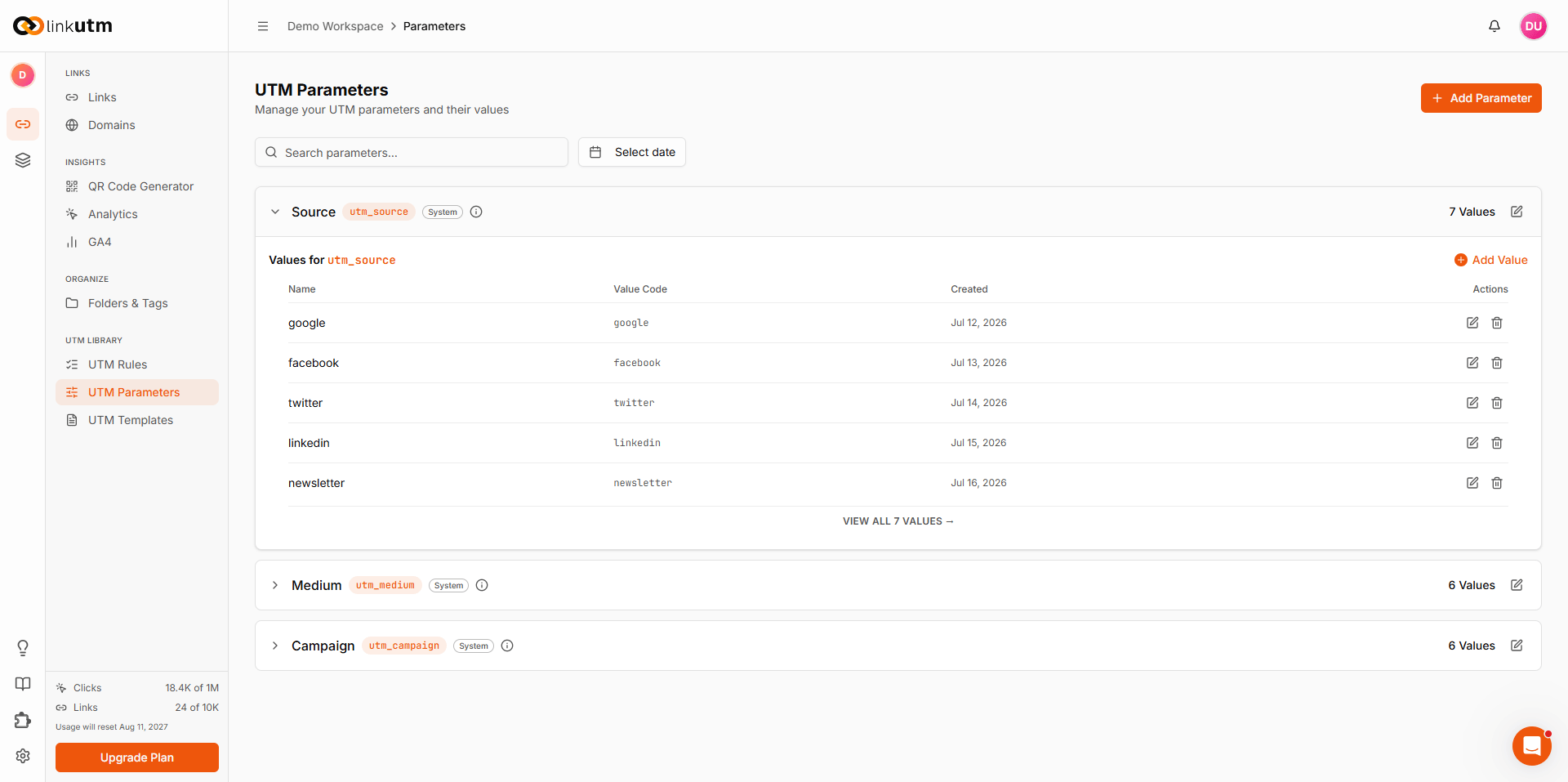
Real-world example
A B2B SaaS company customizes the library:Common mistakes
Mixed-case codes
Mixed-case codes
Codes are forced lowercase on insert.
Newsletter becomes newsletter. Don’t try to maintain casing here.Duplicate codes
Duplicate codes
Codes are unique per workspace. If you try to add a value that already exists (e.g.,
google when it’s already there), the save will fail. Check the existing list first.Deleting a parent with children
Deleting a parent with children
You can’t delete a parent parameter (like
source) while it still has child values under it. Delete the child values first, then the parent.Treating library as the enforcer
Treating library as the enforcer
Library powers autocomplete. It suggests values but doesn’t block anything. To enforce naming standards, configure UTM Rules with prohibited values and character restrictions.