

When to use it
- Building links on the fly while browsing a page you want to promote.
- Shortening and tagging URLs quickly without leaving your current tab.
- Using your saved templates and UTM parameters without opening linkutm in a separate window.
How to install it
1
Open the extension page
In the linkutm sidebar, click the puzzle-piece icon at the bottom. This opens the Chrome Web Store listing.
2
Add to Chrome
On the Chrome Web Store page, click Add to Chrome and confirm the prompt.
3
Connect your account
Click the linkutm icon in your Chrome toolbar. The extension will prompt you to log in. Sign in with your existing linkutm account. The extension connects automatically.
4
Pin the extension (optional)
Click the puzzle-piece icon in Chrome’s toolbar, find linkutm, and click the pin icon so it stays visible.
Real-world example
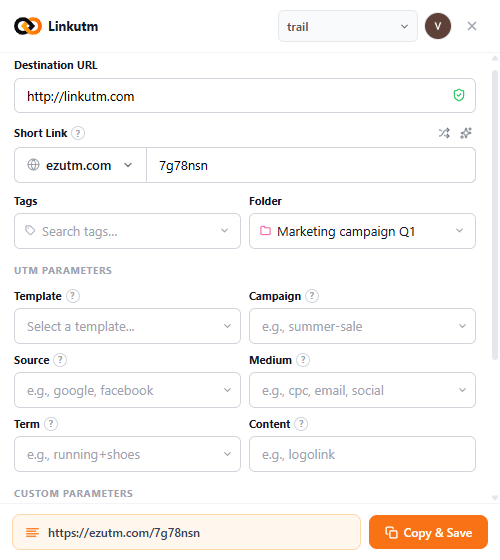
You’re on a product page you want to run a LinkedIn campaign to. Instead of copying the URL, switching tabs, and creating a link in the dashboard:- Click the linkutm icon in your toolbar.
- The destination URL is pre-filled.
- Pick a template or fill UTM fields.
- Hit Create. Your short link is copied to your clipboard.
Common mistakes
Extension not connecting after install
Extension not connecting after install
Make sure the extension is enabled in Chrome. Go to the extensions menu and check that the linkutm toggle is on. Then click the icon and sign in again.
Links not appearing in the right workspace
Links not appearing in the right workspace
You can switch workspaces directly in the extension. Use the workspace switcher inside the extension to select the correct workspace.
Edge cases
Chrome and Chromium only. The extension works in Google Chrome and Chromium-based browsers (Edge, Brave). It is not available for Firefox or Safari.
Staying logged in. The extension stays connected as long as your linkutm session is active. If you log out of linkutm, you will need to reconnect the extension.